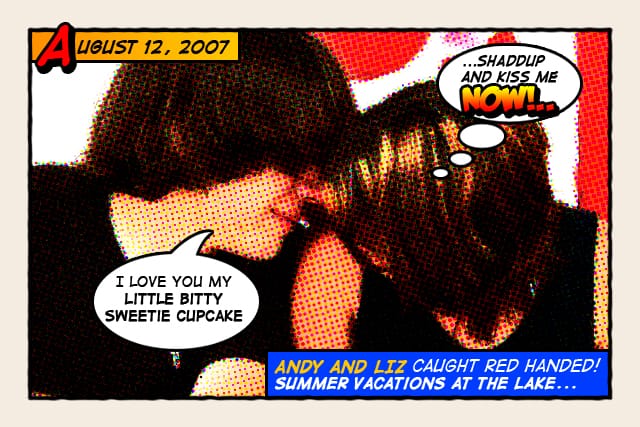
How about a fun effect for your incredibly boring photo albums? Creating a old comic book effect for your photos is easy and the results are visually appealing. More fun is achieved when adding captions to your photos using comic book fonts and design elements.
This tutorial will show you how to give a comic book look to your photos using a couple of filters and some additional decorations.
Click on the image below to see the final results in a bigger size and without compression artifacts.
Original image by Rubén Colorado
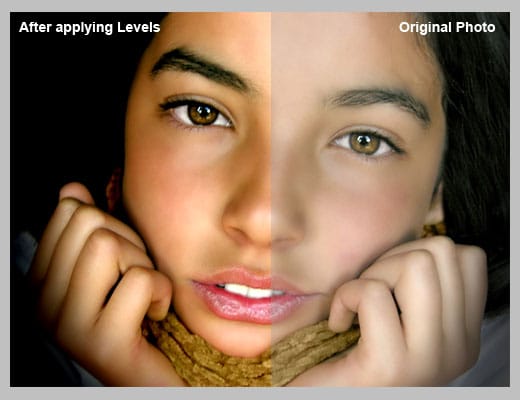
Download and open this photo in Photoshop. Now we are going to increase the overall contrast of the picture by burning it a bit. Go to IMAGE > ADJUSTMENTS > LEVELS…With this image we are going to set the INPUT LEVELS to 60 / 1.00 / 220. But this is only for this example. Choose the best settings for each photo.
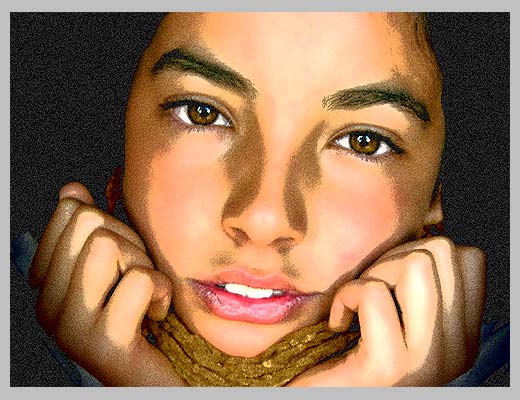
In this step we are going to give the photo an illustrated look with some graininess to give the illusion of an old and bad quality paper. It is not a realistic effect, it is just some distortion to the image to help us achieve the final look. Go to FILTERS > ARTISTIC > FILM GRAIN. In this case we are going to use: GRAIN: 4, HIGHLIGHT AREA: 0, INTENSITY: 10. Try different settings for different photos.
Duplicate the layer and name the new layer HALFTONE
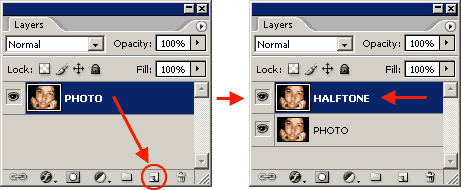
In this step we are going apply a halftone pattern to the image to give the final old comic book printing effect. Go to FILTER > PIXELATE > COLOR HALFTONE. Set MAX RADIUS: 4 and leave the rest with the default values. Press OK and then go to the LAYERS PALETTE and set the BLENDING MODE to DARKEN.
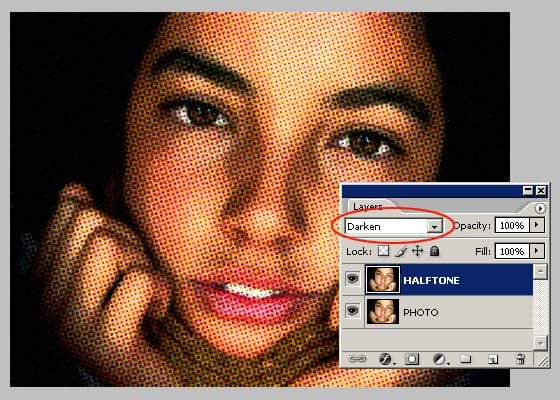
The effect looks nice so far. It is not a realistic old comic book effect, it simple resembles that look. To make it more real, now comes the fun part. We are going to add some unique elements that are very popular on comic books and strips
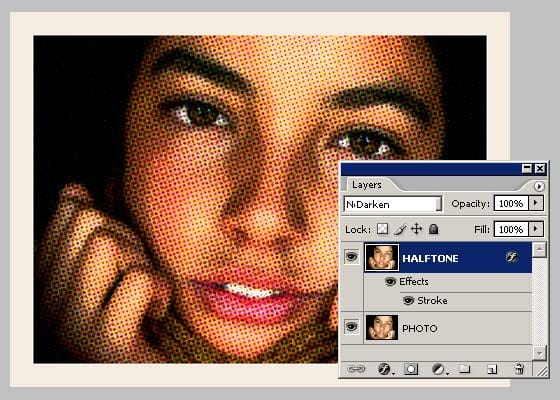
Select the HALFTONE layer and set a STROKE LAYER STYLE of WIDTH: 20px, POSITION: Inside and COLOR: #F5ECE1.
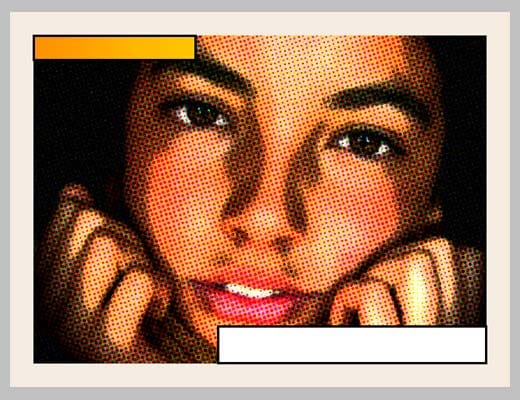
Add a new layer and draw a small rectangle at the top left of the frame of the image. Give it a STROKE of 3 pixels and paint it orange. An orange to yellow gradient looks better. Draw another rectangle, a bit larger this time, on the lower left corner of the frame. Give it a STROKE of 3 pixels and paint it white. The final result should be like the one below:
Lets add a border to the image: Add a new empty layer above the layer containing the rectangles we created in the previous step. Select the RECTANGLE SELECTION TOOL from the TOOLS PALETTE. Draw a selection from the top left (right inside the frame) to the bottom right border of the image.
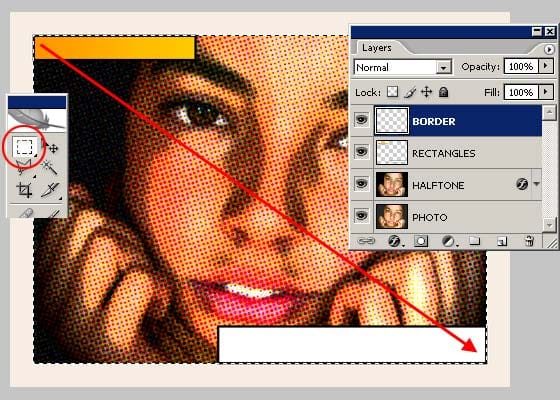
Go to EDIT > STROKE, set WIDTH: 4px, COLOR: BLACK, LOCATION CENTER and press OK.
DESELECT the current selection and go to FILTER > BLUR > BLUR MORE. Then apply a small distortion using FILTER > DISTORT > RIPPLE… (Amount 20%, Size Medium). Now, lets sharpen the stroke a bit with FILTER > SHARPEN MORE and there you have a nice simulated hand drawn border.
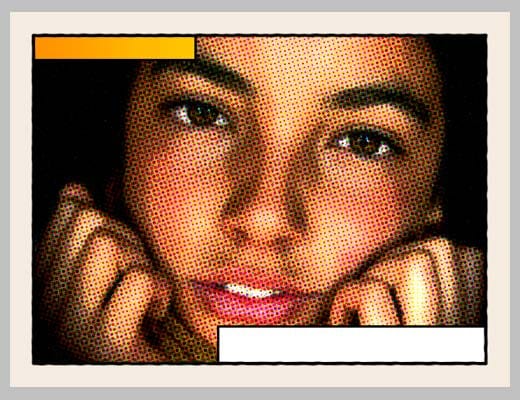
To add captions to the photo you can use any font you like, but only using fonts specially designed for comic books you will be able to achieve the desired look. Download the free font Digital Strip and install it. At the end of this article you will find a lot of free and commercial comic book fonts and resources.
Using the Digital Strip font you’ve just downloaded, type a date on the top orange rectangle. Play with the first letter of the text by adding a stroke, a shadow and a bright contrasting color.
Then write a caption for the photo at the bottom white rectangle. Highlighting some words in bold also looks good.
And that’s all. Your image should look similar to the one below:
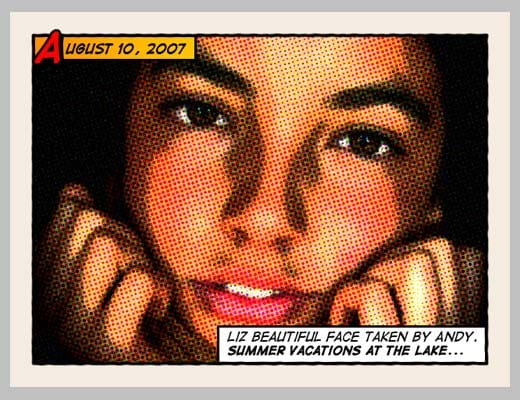
Click on the image to see a larger and uncompressed version.
If you want to learn more about comic book design, you can browse sites like Comic Book Fonts or Balloon Tales for some inspiration. Balloon Tales has published a fantastic comic book lettering tutorial that you should read if you want to make some stunning sound effects. There are lots of comic book resources, but these two are very colorful and loaded with design tips and examples.
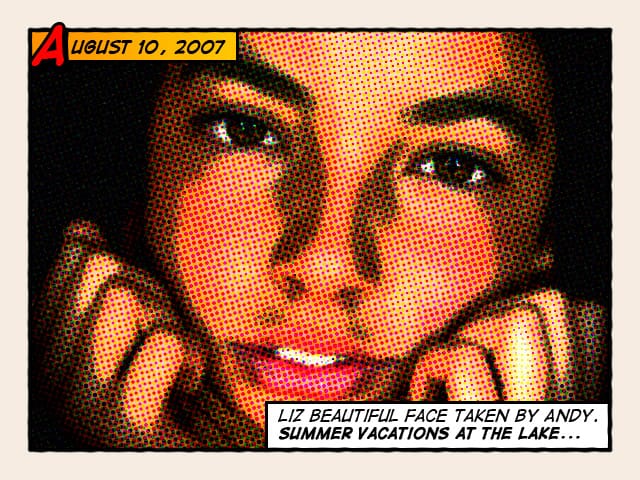
As an example, I’ve created two images using other design elements such as balloons and sound effects:
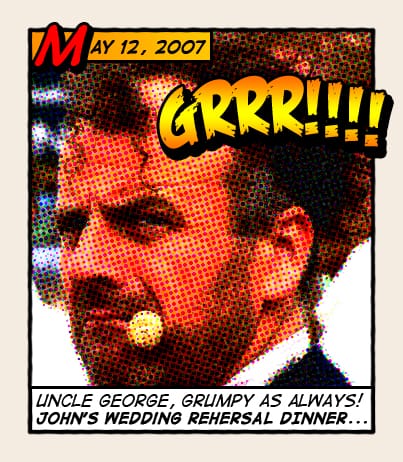
Click on the images to see a larger and uncompressed version of each one
![]() |
![]() |
Original images by Mary R. Vogt and Rupert Jefferies
Check this selection of freeware and commercial comic book resources:
FREE FONTS: Blambot |
FREE SOUND FX CLIPART: Blambot |
FREE COMIC BOOK BALLOONS: Blambot |
FONTS: ComicBookFonts |
TIPS AND TUTORIALS: Balloon Tales |
FONT: Monster Mash |
FONT: Zoom |
FONT: Braaains |
FONT: Goosebumps |


came across your site through blog rush widget. Great article I bookmarked your page! The monster fonts will work great with my website http://www.yardhaunters.net
look forward to your posts in the future
Posted by lafinn on September 16th, 2007 at 2:24 pm
Hi, love this tutorial, great job! =] I found your site through Blog Rush too ^.^
Posted by Faymara on September 16th, 2007 at 6:59 pm
Thank you so much for your comment, it was much appreciated =] I’ll definetly use one of the links you gave me..Keep up the good work!
Posted by Faymara on September 17th, 2007 at 7:49 am
Very nice tutorial, very useful
Posted by mptx on September 21st, 2007 at 12:10 am
Very nice tuto and very useful links
Thanks you
Posted by Parme on September 23rd, 2007 at 3:00 am
amazing.. very useful.. keep on that great job
Posted by natasmi999 on September 24th, 2007 at 4:03 am
[…] Retro, Comic Book Photo Effect on PhotoshopRoadmap […]
Posted by Popular Photoshop Tutorials this Week » Free Photoshop Tutorials and Resources on September 26th, 2007 at 12:42 am
stuck at ‘An orange to yellow gradient looks better’, cant get it yellow to orange.
help!
Posted by johann on September 27th, 2007 at 7:13 am
AMAZING!!! keep it coming… Very effective tutorial and yet very useful.. I wonder what font did you used on that masterpiece he he… Thanks for sharing…
Posted by Anna on September 28th, 2007 at 7:57 pm
[…] Give Your Photos a Retro Comic Book Effect This is probably my favourite tutorial of the month. It’s simple and looks fantastic! Visit Tutorial […]
Posted by PSDTuts - Just Great Photoshop Tutorials » Web Roundup on October 2nd, 2007 at 8:08 pm
muito xike esse blog …
Parabens !!!!!!!!!!!!!!!!!
bjao
Dryka
Posted by Dryka on October 2nd, 2007 at 8:50 pm
i ve been wanting to do this type of effect months before, but always ended up into something else :p thanks. now i have the reason to make my photo album into some kind of comic book LoL
Posted by fahmi on October 3rd, 2007 at 9:17 pm
I really love this tut!
Posted by MD on October 4th, 2007 at 11:26 am
[…] Tens daqueles retratos chatos e não sabes o que hás de fazer com eles? Este tutorial ensina a adicionar um look cartonesco bastante apelativo e engraçado. Um tutorial muito completo e que explica detalhadamente todos os passos, inclui inclusive exemplos de vários tipos de fonts que podem ser usadas e links para o download das mesmas. […]
Posted by Fotojota » As novidades da fotografia digital on October 4th, 2007 at 1:08 pm
[…] Give Your Photos a Retro Comic Book Effect […]
Posted by Photoshop Watch - Today Top Blog Posts on Photoshop - Powered by SocialRank on October 5th, 2007 at 8:06 am
[…] Read More… […]
Posted by Give Your Photos a Retro Comic Book Effect Using Photoshop at Imaging Insider on October 6th, 2007 at 8:33 am
Thanks ! Nice tut (:
Posted by Fergus on October 8th, 2007 at 4:03 pm
[…] Máis ps…..10102007 Tutorial Photoshop Avançado: Scripts e programação Photoshop for geeks Edward Hopper and Me ou como utilizar as cores de algunha pintura famosa nas tuas fotos usando PS. Give Your Photos a Retro Comic Book Effect Easy Watercolor Effects in PhotoShop Top Resource : Brush + Font Sites For Photoshop Bill gates degraded throughout history photoshopgallery of glory […]
Posted by Máis ps…..10102007 « phohp on October 10th, 2007 at 4:14 pm
good tutorial. I will digg it !
Posted by Lau @ Digital Photography Tutorials on October 11th, 2007 at 3:35 pm
[…] They also have a ‘best of the web roundup’ which is where I found a tutorial for this cool Retro Comic Book Effect. You can see my efforts below: […]
Posted by Retro Comic Book Effect in Photoshop | Leigh Nugent Web Design on October 15th, 2007 at 3:38 pm
dear friend
tank you for nice work …..
Posted by mehdi on October 28th, 2007 at 12:21 pm
[…] Visit Tutorial […]
Posted by Best of the Web - September « Studiowhiz.com on October 28th, 2007 at 4:49 pm
[…] Give Your Photos a Retro Comic Book Effect - a quick tutorial that looks great. […]
Posted by Frustration by Design » Speedlinks for September 28, 2007 on October 29th, 2007 at 3:40 pm
I have been inspired by your tutorial to test it out on some of my own photos and have spent the last couple of weeks trying out some of your tips. I’m having so much fun with it - it’s a great way to learn a few PhotoShop tricks, too.
Can’t wait for the next tutorial!
Posted by Anthea on October 31st, 2007 at 10:15 pm
Very very good resource. Thank you for the tutorial -and I hop you bring much more like this in the near future.
Posted by John on November 7th, 2007 at 4:22 pm
[…] Fotografia jak malowana Przetwarzanie zdjęć na obrazy w stylu w jakim tworzyli Warhol, Lichtenstein, albo tworzenie na bazie zdjęć komiksów, to zabawa, która może dać sporo radości. Co istotne - nie potrzebujemy "tych" zdolności manualnych i bez setek dni szlifowania warsztatu, oraz dziesiątek godzin stania przy sztaludze możemy uzyskać całkiem niebanalne efekty. autor: Assaf Gadasi, Nes Ziyona, Israel 2007 […]
Posted by Fotografowie, malarze i graficy on November 8th, 2007 at 1:19 pm
[…] How about a fun effect for your incredibly boring photo albums? Creating a old comic book effect for your photos is easy and the results are visually appealing. More fun is achieved when adding captions to your photos using comic book fonts and design elementsThis tutorial will show you how to give a comic book look to your photos using a couple of filters and some additional decorations… Pretty cool effect :o) Click here to visit >> […]
Posted by Give Your Photos a Retro Comic Book Effect on November 17th, 2007 at 9:30 pm
[…] To increase the retro comic book look, captions and sound text effects are added. Read more about Photo to comic book effect in The Photoshop […]
Posted by Photo to comic book effect using Film Grain and Halftone plugins « Adobe Photoshop Plugins on November 22nd, 2007 at 7:13 am
[…] Give Your Photos a Retro Comic Book Effect Wehey! (tags: illustration design comics tutorials tips photoshop) […]
Posted by links for 2007-11-22 « LamaZone on November 22nd, 2007 at 7:19 am
[…] recently read a very detailed tutorial about enhancing your photos with a retro comic book effect. The tutorial is an excellent example of one of the many and varied post-production techniques you […]
Posted by Lilahpops - something about photography on November 23rd, 2007 at 5:30 am
I cannot for the life of me get the orange rectangle to get gradiant i love this effect some one please help me
Posted by Scarlett on December 5th, 2007 at 7:22 pm
hi, cool tips i did a pic n it looks cool but i’m having a problem installing the comic fonts. they wont install and keep sayin invalid can anyone help please mail me
mad-mace-1984@hotmail.co.uk
Posted by steven on December 11th, 2007 at 10:37 am
Way too super … I abso love it!
Posted by CeeAnne on December 19th, 2007 at 10:24 pm
I have Photoshop Elements 5 and I am having some trouble getting the steps to work. Is there any advice someone can give me?
Posted by Mackmaluv on December 28th, 2007 at 12:06 am
I only had problem w/ putting on the comic font i downloaded…
when i use the type tool box and try to type anything, nothing appears on the pic.
how come???
Posted by Ego on January 5th, 2008 at 1:50 pm
[…] Give Your Photos a Retro Comic Book EffectHow about a fun effect for your incredibly boring photo albums? Creating a old comic book effect for your photos is easy and the results are visually appealing. More fun is achieved when adding captions to your photos using comic book fonts and design elements. […]
Posted by Adobe Photoshop Tutorials - Best Of | Tutorials | Smashing Magazine on January 10th, 2008 at 11:54 am
Very good job…I made one is using it as my myspace defualt…
www.myspace.com/zazzyhat
Posted by Kevin on January 10th, 2008 at 3:22 pm
[…] Aquí se explica como hacer que tus fotos tengan apariencia de comic utilizando Photoshop. (Ingles) […]
Posted by Jexweber.es » Convertir tus fotos en Comic on January 10th, 2008 at 5:29 pm
Great job! Keep up the good work!
Posted by Braintrove.com on January 10th, 2008 at 5:33 pm
Great tutorial! Thanks!
Posted by Jonny on January 10th, 2008 at 7:32 pm
Why not just do this with ComicLife Deluxe? Just a few clicks of the mouse…
http://plasq.com - Mac or Windows
Posted by Stu on January 10th, 2008 at 11:06 pm
Thanks
Posted by lonsaa on January 10th, 2008 at 11:52 pm
great work!!!!
Posted by mickey on January 11th, 2008 at 1:07 am
[…] Give Your Photos a Retro Comic Book Effect (tags: photo) […]
Posted by Skylog » Blog Archive » links for 2008-01-11 on January 11th, 2008 at 1:18 am
[…] » Give Your Photos a Retro Comic Book Effect How about a fun effect for your incredibly boring photo albums? Creating a old comic book effect for your photos is easy and the results are visually appealing. More fun is achieved when adding captions to your photos using comic book fonts and design ele (tags: art comics fonts graphics photography tips photography/photoshop) Search […]
Posted by links for 2008-01-11 at James A. Arconati on January 11th, 2008 at 1:19 am
[…] Give Your Photos a Retro Comic Book Effect How about a fun effect for your incredibly boring photo albums? Creating a old comic book effect for your photos is easy and the results are visually appealing. More fun is achieved when adding captions to your photos using comic book fonts and design elements. […]
Posted by site kayit , web sitesi, web tasarim,e-ticaret,WEB TASARIM,e ticaret,eticaret,web tasarim,web,sayfa,tasarim,site,web tasarim, web tasarimi, bilisim, tanitim, flash animasyon, web sitesi, dizayn, design, web sitesi tasarimi, web design, grafik, programlama on January 11th, 2008 at 3:38 am
The download link for the original photo doesn’t work any longer. Can you upload it somewhere or tell us the new link?
Thanks
Posted by A photoshop user on January 11th, 2008 at 8:03 am
I’m having trouble when pixelating the picture.
the pixels are blue/purple etc and i don’t know how to change it to make it look like yours. help?
Posted by steve on January 11th, 2008 at 12:56 pm
[…] Give Your Photos a Retro Comic Book EffectHow about a fun effect for your incredibly boring photo albums? Creating a old comic book effect for your photos is easy and the results are visually appealing. More fun is achieved when adding captions to your photos using comic book fonts and design elements. […]
Posted by Brent Morris’ Blog » Blog Archive » Adobe Photoshop Tutorials - Best Of on January 11th, 2008 at 2:11 pm
[…] » Give Your Photos a Retro Comic Book Effect (tags: photoshop tutorial comic effects) […]
Posted by links for 2008-01-11 « toonz on January 11th, 2008 at 6:19 pm
[…] la web Photoshop Road Map han elaborado este tutorial con el que puedes conseguir dar un look de cómic retro a tus fotos con el Photoshop. Consta de […]
Posted by Dale a tus fotos apariencia de cómic con el Photoshop » Pixfans on January 11th, 2008 at 7:41 pm
[…] » Give Your Photos a Retro Comic Book Effect - […]
Posted by » My del.icio.us bookmarks for January 11th (Adobe Photoshop Collection) at StuartAnderson.eu on January 12th, 2008 at 5:09 am
how do u get the drop show on the red A?
Posted by dannny on January 12th, 2008 at 9:57 pm
[…] Trasformare una foto in una effetto fumetto Come trasformare una foto, in un fumetto retro […]
Posted by I migliori tutorial per Photoshop: trasformare in un fumetto, scrivere in 3d, trasformare in un alieno, trasformare in una statua, modificare la pelle, aumentare le qualità di una foto | Voci dal web on January 13th, 2008 at 4:18 am
[…] Give Your Photos a Retro Comic Book Effect How about a fun effect for your incredibly boring photo albums? Creating a old comic book effect for your photos is easy and the results are visually appealing. More fun is achieved when adding captions to your photos using comic book fonts and design elements. […]
Posted by Mega collezione di Tutorials (in inglese) per Adobe Photoshop | ILaRia LaB on January 14th, 2008 at 12:50 pm
[…] Un tutoriel super sympa a cette adresse […]
Posted by Un effet retro comic : Bloglost on January 16th, 2008 at 12:52 pm
[…] Fotoğrafların çizgi romana dönüştürülmesi […]
Posted by En iyi photoshop dersleri | yuvarlak.net on January 17th, 2008 at 10:36 am
[…] Give Your Photos a Retro Comic Book Effect How about a fun effect for your incredibly boring photo albums? Creating a old comic book effect for your photos is easy and the results are visually appealing. More fun is achieved when adding captions to your photos using comic book fonts and design elements. […]
Posted by Baby’s Sky » Blog Archive » Photo- and Picture Editing and Processing on January 18th, 2008 at 11:06 am
[…] Придайте своему фото эффект комикса.С помощью этого урока можно разнообразить ваш архив фото. Сделайте из своих фотографий комикс. […]
Posted by Большая подборка уроков по фотошопу | Фото XPерт on January 21st, 2008 at 12:28 am
[…] Give Your Photos a Retro Comic Book Effect […]
Posted by Los mejores Tutoriales de Photoshop « Codigo*Pin on January 22nd, 2008 at 7:59 pm
[…] Give Your Photos a Retro Comic Book Effect How about a fun effect for your incredibly boring photo albums? Creating a old comic book effect for your photos is easy and the results are visually appealing. More fun is achieved when adding captions to your photos using comic book fonts and design elements. […]
Posted by 50 Gustosti Tutorial e Guide per graficare con Adobe Photoshop | Giuseppe D'Alessio Live Blog - Tecnologia, società e vita in un sorso... on January 23rd, 2008 at 3:52 am
[…] I made a ‘retro’ comic book-like panel from a photograph of myself, using this tutorial and Photoshop. Awesome baby. Let me know what you think of it. Perhaps I’ll make […]
Posted by Jay Harley - Life is Calling » Blog Archive » Now I appear in comic books! on February 2nd, 2008 at 6:46 pm
Wow, this is awesome! I was looking for a tutorial on how to convert a normal photo to “comic” style, and this looks like it! Thanks much!
Posted by Pete on February 8th, 2008 at 11:31 am
[…] Give Your Photos a Retro Comic Book Effect How about a fun effect for your incredibly boring photo albums? Creating a old comic book effect for your photos is easy and the results are visually appealing. More fun is achieved when adding captions to your photos using comic book fonts and design elements. […]
Posted by » Adobe Photoshop Tutorials Blogu’lu’Amiral: on February 10th, 2008 at 8:50 am
[…] Lo he hecho siguiendo este tutorial: [Give Your Photos a Retro Comic Book Effect] […]
Posted by Efecto Cómic « El Blog de Shiroko on February 15th, 2008 at 7:43 pm
Cool tutorial. Thats a good effect, that can be used for alot of different designs and media. Nice lil tutorial to have in the arsenal. Thanks.
Posted by Inverted Reality Designworks on February 17th, 2008 at 7:08 pm
[…] Fonte: http://www.photoshoproadmap.com/Photoshop-blog/2007/09/13/give-your-photos-a-retro-comic-book-effect… […]
Posted by Retro Comic Book Effect_Photoshop « Tutoriais Flamantes on February 18th, 2008 at 3:26 pm
Those looking for the original source image used in this tutorial, it is now hosted here:
http://picasaweb.google.com/lh/searchbrowse?q=portrait&uname=ruben.colorado.71&psc=F#10
Posted by Raegar on February 20th, 2008 at 2:33 pm
[…] out this great tutorial on creating a comic book effect with ordinary photos, photoshop some color halftone effects and […]
Posted by Photoshop Tutorial: Create a Comic Book Effect with Color Halftone | Heaven Interactive on February 22nd, 2008 at 7:10 pm
[…] Give Your Photos a Retro Comic Book Effect How about a fun effect for your incredibly boring photo albums? Creating a old comic book effect for your photos is easy and the results are visually appealing. More fun is achieved when adding captions to your photos using comic book fonts and design elements. […]
Posted by Blog of World's Sanyi » Altri trucchi per Photoshop on February 25th, 2008 at 4:59 am
[…] Give Your Photos a Retro Comic Book Effect How about a fun effect for your incredibly boring photo albums? Creating a old comic book effect for your photos is easy and the results are visually appealing. More fun is achieved when adding captions to your photos using comic book fonts and design elements. […]
Posted by Recursos y Tutoriales » Blog Archive » Los mejores tutoriales de photoshop on February 27th, 2008 at 7:32 am
[…] Pubblicato il 29 Febbraio, 2008 di surus Ogni tanto mi imbatto in tutorial di Photoshop. The Photoshop Roadmap ne propone uno interessante per dare alla propria foto un effetto da libro di fumetti. La cosa […]
Posted by Photoshop Tutorial « Surus on February 29th, 2008 at 12:16 am
[…] » Give Your Photos a Retro Comic Book Effect (No Ratings Yet) Loading … […]
Posted by links for 2008-03-01 | Moewes.com on March 1st, 2008 at 8:19 am
Very cool effect. Thanks for the links for doing comic lettering on it too
Posted by Isabelle DaJinn on March 7th, 2008 at 10:42 pm
[…] Give Your Photos a Retro Comic Book Effect Posted by Retro Comic Book Effect in Photoshop | Leigh Nugent Web Design on October 15th, 2007 at 3:38 pm. dear friend tank you for nice work … … […]
Posted by Give Your Photos a Retro Comic Book Effect | ooglewindowblinds.com on March 19th, 2008 at 7:15 am
[…] Give Your Photos a Retro Comic Book EffectHow about a fun effect for your incredibly boring photo albums? Creating a old comic book effect for your photos is easy and the results are visually appealing. More fun is achieved when adding captions to your photos using comic book fonts and design elements. […]
Posted by Adobe Photoshop Tutorials on March 20th, 2008 at 4:34 am
[…] Give Your Photos a Retro Comic Book EffectHow about a fun effect for your incredibly boring photo albums? Creating a old comic book effect for your photos is easy and the results are visually appealing. More fun is achieved when adding captions to your photos using comic book fonts and design elements. […]
Posted by Best Tutorial Adobe Photoshop by smashingmagazine.com | Cyber Space in One Hand on March 26th, 2008 at 2:59 am
i did it successfully. i made 2 photos using this effect already. great job. :p
Posted by nina on March 28th, 2008 at 8:16 am
Great !
Thank you
Posted by Leea on March 30th, 2008 at 7:54 am
[…] » Give Your Photos a Retro Comic Book Effect - […]
Posted by My Bookmarks (Adobe Photoshop Collection) | StuAnderson on March 30th, 2008 at 11:03 am
this is a great comic tutorial effect. thanks for explaining this in the simplest form.
more power.
Posted by james on March 31st, 2008 at 12:35 pm
[…] Retro comic book […]
Posted by OPENGIGA TECH — Largest Social Networking Blog on April 5th, 2008 at 11:19 am
[…] Give Your Photos a Retro Comic Book Effect […]
Posted by Adobe Photoshop En İyi Örnekler (Best Tutorials) | BilgiUstam on April 6th, 2008 at 6:27 pm
GREAT TUTORIALS!!!!! Here’s a few I did with your Tutorial (slight variance in technique)
Thanks!
Posted by IamLuckieDog on April 16th, 2008 at 3:08 am
http://a936.ac-images.myspacecdn.com/images01/20/l_0270a954b28e597a2ea76a06773a7297.jpg
Posted by IamLuckieDog on April 16th, 2008 at 3:08 am
darn, i tried to post a pic, but it didn’t work.
Posted by IamLuckieDog on April 16th, 2008 at 3:09 am
Hopefully this’ll work…?…here’s one of them.
Posted by IamLuckieDog on April 16th, 2008 at 3:11 am
This is an excellent tute! Thanks so much. I’m excited to try this out.
Posted by Billy Buttons on April 22nd, 2008 at 11:47 am
this tutorial is awesome!! very very helpful! more tutorials to come! thankssssss:)
Posted by coolgirl88 on April 24th, 2008 at 11:40 am
[…] Give your photos a retro comic book effect […]
Posted by 45 Photo Editing Tutorials for Photoshop | Vandelay Website Design on April 29th, 2008 at 7:15 pm
[…] Give Your Photos a Retro Comic Book Effect […]
Posted by Weekly top quality Photoshop tutorials #2 | Photoshop Tutorials on April 30th, 2008 at 7:32 am
[…] Give your photos a retro comic book effect […]
Posted by Photoshop Tutorial: 45 ways to enhance a photo | Felix Ker's blog on May 4th, 2008 at 3:27 am
[…] Give Your Photos a Retro Comic Book Effect […]
Posted by Dünyanın en iyi Photoshop çalışmaları ve aşama aşama nasıl yapıldıkları | on May 4th, 2008 at 11:21 am
[…] Give Your Photos a Retro Comic Book Effect How about a fun effect for your incredibly boring photo albums? Creating a old comic book effect for your photos is easy and the results are visually appealing. More fun is achieved when adding captions to your photos using comic book fonts and design elements. […]
Posted by Recursos y Tutoriales » Blog Archive » Los mejores tutoriales de Photoshop del momento on May 6th, 2008 at 7:51 am
[…] Give your photos a retro comic book effect […]
Posted by Tutoriales para Photoshop!!! « Beach,office & cookies on May 6th, 2008 at 11:17 am
[…] Via | The Photoshop Roadmap […]
Posted by Video Tutorial in HD: Come trasformare le foto in vecchi fumetti con Photoshop - Geekissimo on May 8th, 2008 at 3:00 am
It’s nice to an original tutorial. Great work. Thanks for sharing I have a website design that this will come in handy for.
Posted by PS Website Design on May 11th, 2008 at 3:58 am
[…] ThePhotoshopRoadmap ha pubblicato un interessante tutorial che spiega come trasformare le vostre immagini in un fumetto dallo stile retrò. I passaggi sono molto semplice, ma l’effetto finale è di sicuro impatto. […]
Posted by Da fotografia a fumetto | Scatto Design PRO. on May 11th, 2008 at 5:06 pm
[…] Professional “glamour style” photo retouch iMouse — creating Apple mouse Give Your Photos a Retro Comic Book Effect Space and Planet Tutorial Faking HDR in Adobe Photoshop 11 Super Awesome Photoshop Movie Effects […]
Posted by Dnya’nn en iyi Photoshop almalar ve aama aama nasl yapldklar on May 12th, 2008 at 10:05 am