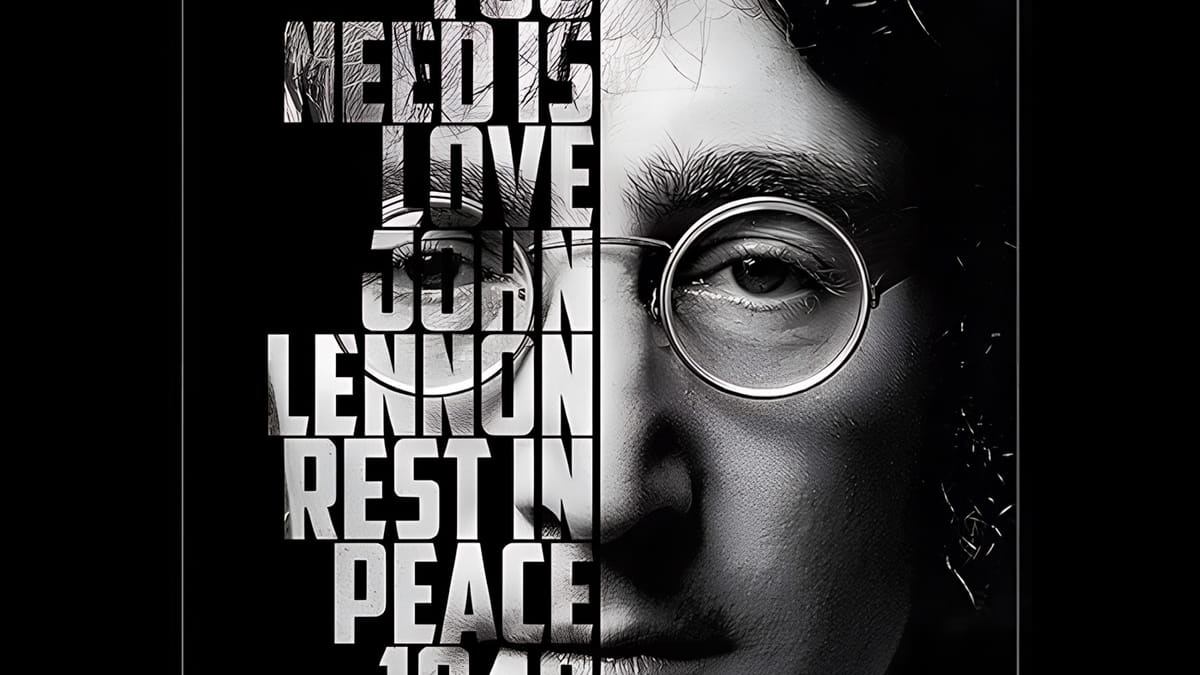
How to Create Typographic Portraits Using AI in Photoshop with Gemini 3

How to Create Typographic Portraits Using AI in Photoshop with Gemini 3

Typographic portraits transform ordinary photos into striking vector-style graphics where flowing text wraps naturally around facial contours and features. This AI-powered technique uses two strategic prompts to first create a high-contrast version of your portrait, then fills it with customizable text that follows the curves and shadows of the face.

The process works with any portrait photo, whether color or black and white, and takes just minutes to complete using the advanced capabilities of Gemini 3's contextual intelligence.

Watch the Video

Video by Photoshop Arthouse. Any links or downloads mentioned by the creator are available only on YouTube

Practical Tips

These key techniques will help you achieve the best results with your typographic portraits:

  • Select your entire image using Ctrl+A (or Cmd+A on Mac) before running each prompt to ensure the AI processes the full portrait
  • Enable the contextual taskbar from Window menu if it's not visible - this provides access to the AI model selection and prompt interface
  • Customize the text theme in your second prompt to match your subject matter, using relevant words that relate to the person or concept in the portrait
  • Use the Properties panel to generate multiple variations of your typographic portrait without re-entering prompts
  • Allow 10-20 seconds processing time for each generation, as the AI analyzes facial contours and text placement simultaneously

Explore more advanced AI techniques and creative workflows for enhanced image transformations:
How to Use Gemini 3.0 Nano Banana Pro for Advanced AI Image Transformations in Photoshop
Gemini 3.0 Nano Banana Pro delivers 4K resolution transformations and contextual intelligence that surpasses previous AI models in Photoshop. This advanced system can create movie posters, redesign interiors, sharpen blurry photos, and even translate foreign text while maintaining original design elements. The model costs 10 generative credits per image but handles complex tasks like night-to-day conversions and multi-frame storyboard creation with remarkable accuracy. Watch the Video Pract
How to Use Nano Banana Pro in Adobe Firefly for Advanced AI Image Generation
Adobe Firefly now includes Gemini 3 with Nano Banana Pro, offering sharper 2K image generation with improved text clarity and precision blending. This advanced AI model works seamlessly within Firefly's generative workspace, enabling powerful workflows like multi-image composition and virtual try-on effects. The integration provides access to sophisticated presets and reference image capabilities that go beyond basic Photoshop workflows, making complex generative tasks simple and intuitive. W
Create a cool text portrait in Photoshop – Photoshop Roadmap
Learn how to create a striking typographic portrait poster in Adobe Photoshop, transforming a standard photo into an artwork where text defines the contours of the subject’s face. You’ll practice essential techniques: precise subject selection, background preparation, thoughtful text integration, and subtle refinements to enhance legibility and visual
Create Elegant Christmas Lettering for Your Holiday Designs With Photoshop and Nano Banana
Most of us aren't lettering artists, and creating ornamental text for holiday designs can be tough. The usual alternative is browsing through marketplaces, hoping to find the perfect style—only to discover it's pricey, locked behind a subscription, or bundled with things we don't need. Free decorative fonts help a little, but they don't offer the flowing curves, swirls, and ornaments that give Christmas designs that magical, elegant look. The good news is that AI tools have changed a lot. What

Get tutorials & freebies delivered to you.

Subscribe to the Photoshop Roadmap newsletter, a weekly roundup of new tutorials, insights and quality downloads, trusted by 6500+ readers.

You might also like

6 Essential Photoshop Effects You Really Need to Learn

Not every Photoshop effect is worth your time. Some are novelties, some are niche, and some will date your work faster than you expect. These six are different — they show up constantly across editorial, advertising, and digital design, and they're the ones most self-taught users have somehow never...

How to Use Photoshop's New Offline AI Remove Tool (No Credits Required)

Photoshop's latest update introduces an offline AI-powered Remove tool that works without internet connectivity or generative credits. This on-device feature processes a 4-5GB AI model locally, enabling fast object removal while maintaining complete privacy since your images never leave your computer. The tool requires high system specifications but...

How to Use the Harmonize Tool for Advanced Photo Compositing in Photoshop 2026

The Harmonize tool transforms compositing by automatically adjusting lighting, color, and shadows to blend objects seamlessly into new backgrounds. This AI-powered feature analyzes both your subject and background, then creates realistic color bleed, reflections, and contact shadows with a single click. While the tool delivers impressive results instantly, combining it...

How to Use Split Toning and Enhanced AI Masks in Camera Raw

Adobe's latest Camera Raw update brings two powerful enhancements that transform how photographers work with masks and color grading. Split toning is now available directly within individual masks, allowing precise color control over shadows, midtones, and highlights in specific image areas. Additionally, AI masks like landscape selection and...

How to Use Harmonize and Rotate Object Tools for Better Composites in Photoshop

Creating believable composites traditionally required hours of manual perspective adjustments and color matching. Two new AI-powered tools in Photoshop change this workflow dramatically. The Rotate Object tool lets you adjust positioning and perspective with interactive 3D controls, while the Harmonize tool automatically matches lighting, shadows, and color tones to blend...

Camera Raw Feathering and Color Grading Features (May 2026 Update)

Adobe Camera Raw's latest update introduces two powerful masking features that solve common editing problems. The new feather and edge controls help create cleaner selections around complex shapes like trees, while color grading within masks allows for precise adjustments without affecting the entire image. These tools work exclusively...

You’ve successfully subscribed to Photoshop Roadmap
Welcome back! You’ve successfully signed in.
Great! You’ve successfully signed up.
Success! Your email is updated.
Your link has expired
Success! Check your email for magic link to sign-in.